AWS Cognito Sign In with Node.js
Let's add AWS Cognito Sign In function to the Node project today. I suppose your project already add AWS Cognito Sign Up to your project.
If not, please take a look at my provious articles:
Also, you can download the full codebase (opens in a new tab) here for AWS Cognito Signin if you are interested in this AWS Cognito Sign In.
Add a AWS Cognito Sign In route
- Add /api/auth/signin (opens in a new tab) route in existing your node.js project, if don't use validateSigninRequest (opens in a new tab) middleware, then you can remove the
validateSigninRequestmiddleware.
import controller from '../controllers/auth.controller';
import {
  validateSignupRequest,
  validateSignupConfirmRequest,
} from '../middleware';

export default (app) => {
  app.post('/api/auth/signup', validateSignupRequest, controller.signup);
  app.post(
    '/api/auth/email/verify',
    validateSignupConfirmRequest,
    controller.signupConfirm,
  );
  app.post('/api/auth/signin', validateSigninRequest, controller.signin); // add signin route
};
Add a Sign In Function in the auth controller.
- Add a Sign In Function (opens in a new tab) in the controller.
// User Signup
import CognitoIdentity from '../services/cognito';

const CognitoIdentityService = CognitoIdentity();

const signin = async (req, res) => {
  const { email, password } = req.body;
  const cognitoParams = {
    username: email,
    password,
  };

  try {
    const cognitoUser = await new Promise((resolve, reject) => {
      CognitoIdentityService.signin(cognitoParams, (err, user) => {
        if (err) {
          reject(err);
        } else {
          resolve(user);
        }
      });
    });

    // DB logic here
    // ...

    res.status(200).send({
      success: true,
      message: 'User logined successfully',
      user: cognitoUser,
    });
  } catch (error) {
    res.status(400).send({ success: false, message: error.message, error });
  }
};

export default {
  signup,
  signupConfirm,
  signin, // add
};
Add a Sign Up Email Confirm in the services.
And then we need to add the AWS Cognito user authentication service to the services folder. I will use the amazon-cognito-identity-js for the service. If you don't understand how to work the service, please check the service folder structure on my git repository (opens in a new tab).
services/
  └──cognito/
        ├── index.js
        └── methods/
              ├── index.js
              ├── signup.js
              ├── signin.js // add
              └── signupConfirm.js
This is a signin file, please add it.
import {
  CognitoUserPool,
  CognitoUser,
  AuthenticationDetails,
} from 'amazon-cognito-identity-js';

/**
 * Signin
 * @param {*} poolData
 * @param {{username, password}} body
 * @param {*} callback
 */

const signin = (poolData, body, callback) => {
  const userPool = new CognitoUserPool(poolData);

  const { username, password } = body;

  const authenticationData = {
    Username: username,
    Password: password,
  };

  const authenticationDetails = new AuthenticationDetails(authenticationData);

  const userData = {
    Username: username,
    Pool: userPool,
  };

  const cognitoUser = new CognitoUser(userData);

  cognitoUser.authenticateUser(authenticationDetails, {
    onSuccess: (res) => {
      const data = {
        refreshToken: res.getRefreshToken().getToken(),
        accessToken: res.getAccessToken().getJwtToken(),
        accessTokenExpiresAt: res.getAccessToken().getExpiration(),
        idToken: res.getIdToken().getJwtToken(),
        idTokenExpiresAt: res.getAccessToken().getExpiration(),
      };
      callback(null, data);
    },
    onFailure: (err) => {
      callback(err);
    },
    mfaRequired: () => {
      const data = {
        nextStep: 'MFA_AUTH',
        loginSession: cognitoUser.Session,
      };
      callback(null, data);
    },
    totpRequired: () => {
      const data = {
        nextStep: 'SOFTWARE_TOKEN_MFA',
        loginSession: cognitoUser.Session,
      };
      callback(null, data);
    },
    newPasswordRequired: () => {
      const data = {
        nextStep: 'NEW_PASSWORD_REQUIRED',
        loginSession: cognitoUser.Session,
      };
      callback(null, data);
    },
  });
};

export default signin;
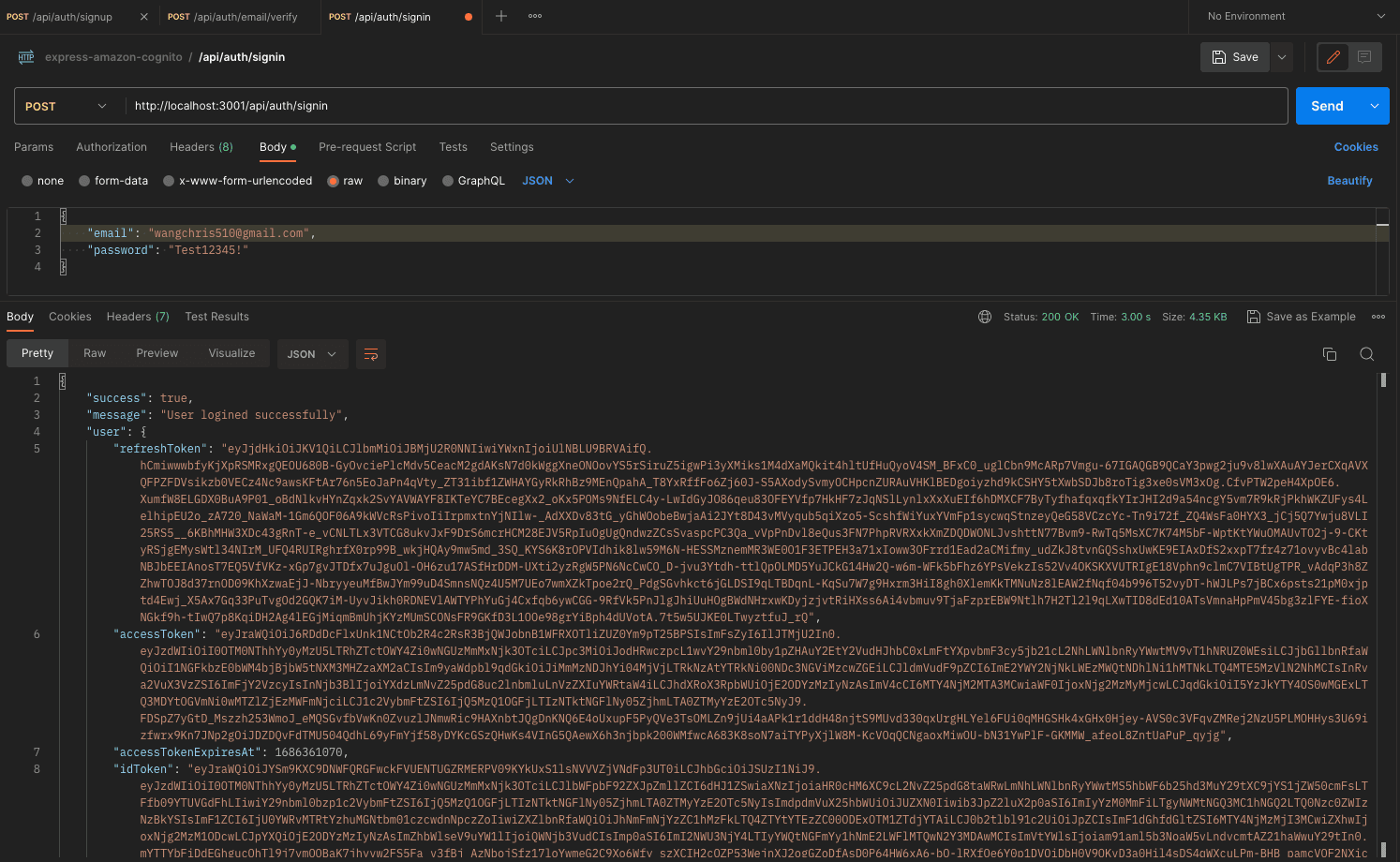
The Result in the Postman
References
https://github.com/elie-tdev/express-amazon-cognito/tree/congnito-signin (opens in a new tab) https://docs.aws.amazon.com/cognito/latest/developerguide/cognito-user-pools-social-idp.html#cognito-user-pools-social-idp-step-1 (opens in a new tab)